
Debugging
- Daniel Macias

- Jan 4, 2021
- 2 min read
Dell Warranty Import provides robust logging throughout the entire app, allowing for any customer to troubleshoot issues they may have along the way. Five different logging types occur in Dell Warranty Import.
Logging type reflects the value in Dell Warranty Import's Logging Type System Property.
The following describes how to access and change the Logging Type and an explanation of each logging type.
Logging Type - Access and Change
Log in as an Import Admin or ServiceNow Admin
Navigate to Dell Warranty Import-- Settings:

Once in Settings, Click on "Advanced Settings":

Select the "Log Level" Dropdown:

Log Level" has the following five options, which you can change by selecting the value in the Log Level dropdown:
o Default
o App Logs
o Info Messages
o All

After you have chosen your logging type for "Log Level", select "Save Settings".
Logging Type - Different Types of Logging
Dell Warranty Import provides five different logging types, and the following describes what each type of logging allows you to debug across the application.
Default
"Default" is the default type of logging and logs the minimal amount of information in ServiceNow to include success & failure messages in Dell Warranty Imports Logs.
App Logs
"App Logs" enables logging of which functions, jobs, or actions Dell Warranty Import is processing so that you can see where the activity is occurring throughout the application.
Info Messages
"Info Messages" enables robust Info Messages (Pop up messages) across the UI of which functions, jobs, or actions are processing so that you can see where the activity is occurring throughout the application.
All
"All" enables all logging, including "App Logs", and "Info Messages" logging.
Logging - Examples of System Logging and Info Messages
Depending on the logging you have enabled, you will either see additional logging in Dell Warranty Imports Logs or additional Info Messages throughout the UI. The following outlines where to find these and what they look like.
App Logs
Navigate to Dell Warranty Import -- Reporting -- Logs:

Within the logs module, you will see any App logs that have been created by Dell Warranty Import.

Info Messages
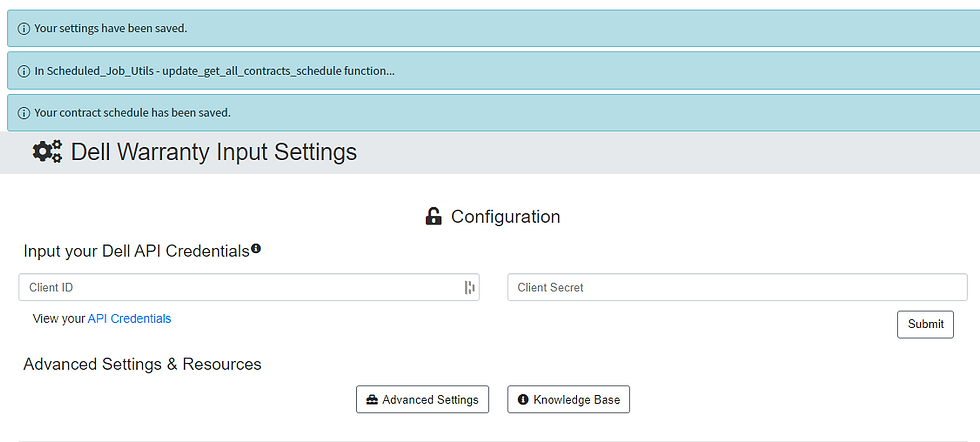
Whenever Dell Warranty Import begins processing something, you will see info messages pop up at the top of the area you are currently in.
Navigate back to the Step-by-Step Guide to continue exploring Dell Warranty Import.
Comments